

Every analysis you run is saved automatically. There are two places to find your previous runs:
- Related Topics – open a fixture and your earlier runs are listed in the Related Topics panel on the right, named by type and date (“PM #1 – 6 Jul 26” for pre-match, “IP #1” for in-play). Click one to reopen the full analysis exactly as it was generated.
- Historical search – your analysis history is searchable at any time, covering the previous 72 hours.
You can also filter the fixture view to Researched (only matches you have analysed) or Recommendations (only analysed matches with clear recommendations).
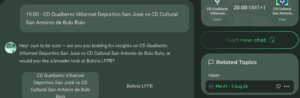
On any given fixture, you can also use the right hand menu to check for related topics – for example, a match is In-Play and you want to check your Pre-Match analysis.