

Everything to do with your subscription is managed inside your account at app.geckoedge.ai. Sign in with your registered email (the address you used at checkout). Bottom left, click the three dots next to your username, then select Manage Subscription.
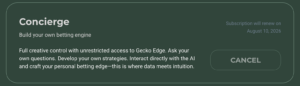
From that page you can:
- Upgrade or downgrade. Move between plans at any time. Upgrades take effect straight away, with a prorated charge for the rest of the current period. Downgrades take effect at the end of the current period, so you keep the higher-tier access you have paid for through to the renewal date.
- Cancel. One click ends the auto-renewal. You keep full access for the remainder of the period you have paid for, then the account drops to the free tier. No cancellation fee.
- Update payment details. Contact us and we’ll send you a link to update your billing details.
- Check your next renewal date, shown alongside the current plan summary.
Receipts arrive in your registered inbox after each charge, so your email history doubles as your payment record.
If the page does not show what you expect (a plan you don’t recognise, two active subscriptions, the wrong renewal date), email support@geckoedge.ai with a screenshot and your registered email and we will reconcile it.